 Storage Waste Just Became Your Fastest Cloud Savings Win, And Everyone’s Still Staring at VMs
Your FinOps team just recovered 15% of cloud spend by deleting unattached EBS volumes and orphaned snapshots in under a week. Meanwhile, your six-month compute rightsizing initiative is still in the planning phase. Storage waste has become the low-hanging fruit everyone’s walking past.
While engineering teams obsess over rightsizing VMs and terminating idle compute instances, storage waste unattached volumes, orphaned snapshots, and data left to rot across lifecycle tiers has quietly become the larger cost drain in mature cloud environments, yet receives a fraction of the optimization attention. The three fastest waste recovery actions are all storage-related, not compute-related, and they recover 10-15% of total cloud spend within days versus weeks or months for VM rightsizing.
The FinOps industry has trained everyone to treat compute as the primary cost lever because it’s the most visible line item. But mature organizations are leaving millions on the table by overlooking storage waste that can be eliminated within days with automated policies that run themselves indefinitely.
Storage waste now delivers faster ROI than compute optimization
The numbers don’t lie. The three fastest actions to recover wasted spend are deleting unattached EBS volumes, terminating idle EC2 instances, and removing orphaned snapshots. These three actions alone recover 10-15% of total cloud spend within days.
Here’s the breakdown: unattached EBS volumes cost $0.10/GB/month for GP3 volumes while doing absolutely nothing. When an EC2 instance is terminated without “Delete on Termination” enabled, its attached volumes persist indefinitely. These orphaned volumes represent 100% waste there’s zero architectural risk in removing the data, snapshotting it if you’re paranoid, and then deleting the volume. The savings potential is 100% because you’re paying full price for storage that serves no instance.
Orphaned snapshots accumulate even faster. Snapshots from deleted volumes pile up at $0.05/GB/month, thousands per month, with no source volume to reference. They’re ghosts haunting your bill.
Compare this to compute rightsizing, which requires collecting at minimum 14 days of data, ideally 30 days, to capture weekly patterns and monthly spikes. Then you need to test in staging first by downsizing equivalent staging instances and running load tests simulating production traffic patterns. For Auto Scaling group-managed instances, you update the launch template with the new instance type and perform a rolling update. Then you monitor for 48 hours, watching CloudWatch alarms for CPU, memory, latency, and error rate regressions. You need a rollback plan ready keep the previous launch template version so if metrics degrade, you can revert within minutes.
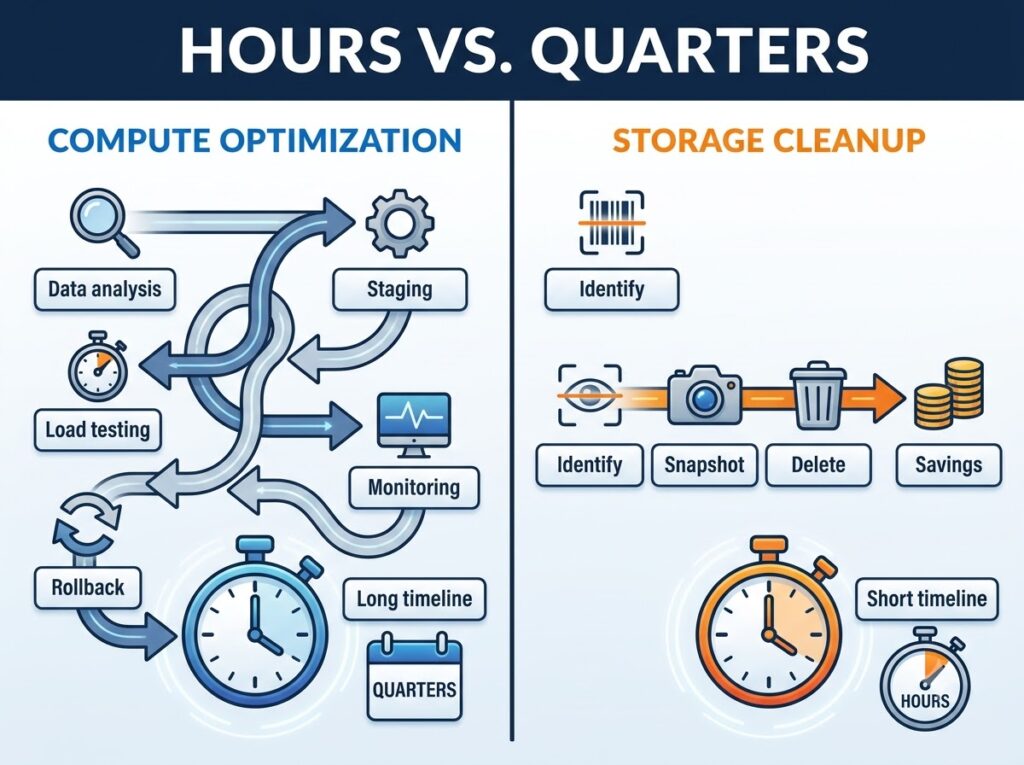
That’s 30-90 days of data collection, staging environment testing, 48-hour monitoring windows, and rollback plans. For storage? You run an API call, check that the status field shows “available,” snapshot if needed, and delete. Done in hours, not quarters.
Mature organizations inherit storage sprawl from every past migration.
Data migration projects systematically create storage waste because teams migrate data forward but never delete source data. Every cloud migration adds a layer of forgotten storage. Data migration projects leave behind source data nobody deleted the old volumes, the intermediate staging buckets, and the “we’ll clean this up later” snapshots that never got cleaned up.
Backup policies compound the problem by creating snapshots on daily schedules with no retention limits by default. Teams configure automated backups thinking they’re being responsible, then never configure retention because removing data takes deliberate effort while keeping it is the default behavior. Log files pile up in object storage for the same reason nobody gets credit for deleting old logs, but everyone gets blamed if logs aren’t available when debugging.
This pattern means mature organizations with multiple migrations have inherited storage debt from every past project. Your first AWS migration in 2018 left volumes behind. Your Kubernetes migration in 2020 left more. Your multi-region expansion in 2022 added another layer. Each initiative created resources, migrated workloads forward, closed the project ticket, and walked away. The volumes are still running.
S3 lifecycle policies alone cut storage costs 58% with zero code changes
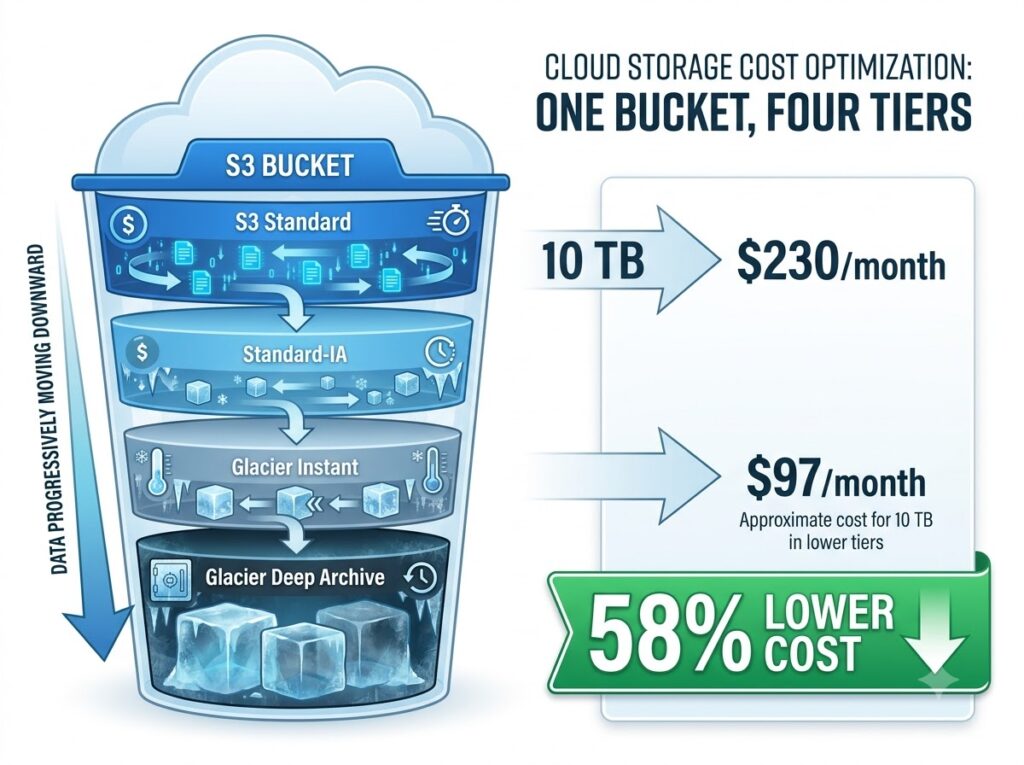
S3 Standard costs $0.023/GB/month. Most data accessed less than once per month should be in a cheaper tier, yet it remains in S3 Standard by default because nobody configured lifecycle policies.
Implement lifecycle policies that automatically transition objects based on age across storage classes. S3 Standard-IA costs $0.0125/GB/month for infrequent monthly access. S3 Glacier Instant costs $0.004/GB/month for rare quarterly access. S3 Glacier Deep Archive costs $0.00099/GB/month for compliance and archive data.
Here’s the math on a 10TB bucket. With everything in S3 Standard at $0.023/GB/month, that’s $230/month. With lifecycle policies moving 70% of data to Glacier Instant after 90 days, you get $28 for Glacier (7TB at $0.004/GB/month) plus $69 for Standard (3TB at $0.023/GB/month), totaling $97/month, a 58% reduction.
This requires no code changes, no performance testing, and no rollback plan just policy configuration. You define the transition rules, save the policy, and S3 handles the rest automatically forever. Your application code doesn’t change. Your API calls don’t change. The data just moves to cheaper tiers based on age.
Volume type migration saves 84% per volume, while rightsizing saves 20-40% on compute.
Many organizations still run io1 volumes that could be gp3 because storage audits happen less frequently than compute reviews. For a 500GB volume provisioned with 3,000 IOPS, io1 costs $257.50/month ($0.125/GB/month plus $0.065/IOPS) versus gp3 costs $40/month ($0.08/GB/month with 3,000 free IOPS). That’s 84% savings per volume.
Beyond volume-type migration, right-size volume capacity. A 1TB GP3 volume using only 200GB costs $80/month. Shrinking to 250GB (with buffer) costs $20/month, another 75% reduction on top of tier optimization.
Right-sizing compute delivers 20-40% savings on compute costs alone and requires extensive testing. Storage migration delivers 84% savings and can be tested in staging with near-zero risk. You create a snapshot, create a new gp3 volume from that snapshot, attach it to a staging instance, run your tests, and then repeat in production. If something breaks, which is rare because GP3 now outperforms legacy io1 for most workloads, you reattach the old volume. Total risk: minutes of downtime in a maintenance window.
The ROI math is brutal. If you have 100 io1 volumes averaging 500 GB each with 3,000 IOPS, you’re spending $25,750/month. Migrating them to GP3 drops that to $4,000/month, saving $21,750/month or $261,000/year. That migration can happen in two weeks. A compute rightsizing initiative targeting 20-40% savings takes quarters and requires weekly FinOps meetings, engineering and finance alignment, and executive sponsorship before day 30.
Monthly zombie cleanups recover 15-20% of waste with none of the drama
A scheduled monthly cleanup of unattached volumes, forgotten snapshots, idle load balancers, and unused IPs consistently recovers 15-20% of waste within 30 days. A monthly cleanup typically recovers 15 to 20 percent of waste within 30 days through pure deletion with zero performance risk.
Unattached volumes, forgotten snapshots, idle load balancers, and unused IPs drain budgets silently with no stakeholder pushback when removed. Nobody’s application breaks when you delete a snapshot from a volume that was terminated eight months ago. Nobody’s service degrades when you remove an elastic IP that hasn’t been associated with an instance in 90 days.
This requires no executive sponsor, no sprint planning, and no staging environment testing—just API calls and deletion. You query the EC2 API for volumes with status “available,” check their last attachment date, snapshot anything under 30 days old (to be safe), and delete the rest. You query for snapshots, check if their source volume still exists, and delete orphans. You query for elastic load balancers with zero active connections for 30 days and terminate them. You query for elastic IPs not associated with running instances and release them.
Compare this to compute rightsizing, which demands weekly FinOps meetings, engineering and finance alignment, and executive sponsorship before day 30. Storage cleanup is something a single engineer with API access can execute during a maintenance window and report back with a cost savings number by the end of the week.
Storage policies enforce themselves, compute optimization requires constant human intervention.
Amazon Data Lifecycle Manager automatically manages snapshot retention with policies for daily snapshots retained for 7 days, weekly snapshots retained for 4 weeks, and monthly snapshots retained for 12 months. You configure the retention policy once, and it runs forever. EBS snapshots are incremental, but they still accumulate cost without automated lifecycle management.
Enabling “Delete on Termination” for all non-persistent volumes prevents future orphaned volumes automatically with no ongoing effort. It’s a boolean flag on volume attachment. Set it to true for anything that shouldn’t persist beyond instance lifetime—application volumes, cache volumes, and temporary workspace volumes. Set it once per Auto Scaling launch template, and every instance launched from that template inherits the setting.
S3 lifecycle policies automatically transition objects based on age across Standard, Standard-IA, Glacier Instant, and Deep Archive tiers. Configure the policy with transition rules to move to Standard-IA after 30 days, move to Glacier Instant after 90 days, and move to Deep Archive after 180 days and S3 executes those transitions automatically forever. No cron jobs, no Lambda functions, no human intervention.
Compute rightsizing is not a one-time project. It requires quarterly reviews because workloads change and savings erode without human oversight. Traffic patterns shift. Feature launches increase load. Code changes alter resource consumption. The t3.medium instance perfectly sized in January is overprovisioned by April when the team optimized their database queries, but nobody’s going back to downsize it unless there’s a quarterly review on the calendar.
Storage optimization, by contrast, runs on autopilot. Once you set the lifecycle policy, enable Delete on Termination, and configure Data Lifecycle Manager retention rules, those policies execute automatically as long as the resources exist.
But compute costs are still the biggest line item shouldn’t we optimize there first?
Compute costs still represent the largest absolute dollar amount on most cloud bills, so optimizing VMs delivers bigger total savings even if storage optimization has better percentage returns and faster implementation. This objection assumes you can only optimize one or the other, when the reality is that storage optimization’s speed and simplicity make it the forcing function for building FinOps muscle.
The three storage actions that recover 10-15% of spend in days create executive buy-in, establish baseline visibility, and fund the longer compute optimization efforts. You’re not choosing between them you’re sequencing them correctly.
Start with storage to prove ROI fast, then use that momentum and recovered budget to fund the 30-90 day data collection and cross-functional coordination that compute rightsizing actually requires. Organizations that start with compute optimization often stall in analysis paralysis while continuing to hemorrhage storage costs that could have been stopped in a week.
Here’s what that sequence looks like in practice. Week one: audit unattached volumes and orphaned snapshots, calculate monthly waste, and get approval to delete resources older than 30 days. Week two: execute deletions, document savings, and publish a one-page report showing 12-15% cost reduction. Week three: present that win to finance and engineering leadership, request budget and headcount to start a proper compute rightsizing initiative. Week four: use the recovered storage costs to fund cloud cost monitoring tools and the 30-day data collection period for compute analysis.
The storage win buys you the political capital and the literal budget to tackle compute optimization properly. Trying to start with compute means asking for 90 days and a cross-functional team before showing any results. Most FinOps initiatives die in that planning phase. Storage wins keep the program alive long enough to tackle harder problems.
—
The FinOps industry has trained teams to treat compute as the primary cost lever because it’s the most visible line item, but mature organizations are leaving millions on the table by skipping past storage waste that can be eliminated in days with automated policies. Stop walking past the low-hanging fruit. Start with storage, recover 15-20% in the first month, then use that win to fund the longer compute optimization work everyone’s already planning. The fastest path to sustainable cloud cost optimization runs through the storage resources everyone’s been ignoring.